brainspy.processors.simulation package#
Module contents#
This package contains the files necessary for handling the software processors that handle internal differences within the main Processor class. Instead of having a driver, it is composed of a deep neural network model (with frozen weights). The SoftwareProcessor module expects input data that is already plateaued. SoftwareProcessors do not require any sort of ramping in the inputs, as this would reduce the overall performance in computing the outputs. However, plateaued data is allowed as it might help with simulating noise effects, providing a more accurate output than that without noise. For faster measurements, where noise simulation is not needed, a plateau of lenght 1 is recommended. Apart from the waveform difference, the SoftwareProcessor also applies to the output several effects such as the amplification correction of the device, clipping values, or relevant noise simulations. The hardware output is expected to be in nano-Amperes. Therefore, in order to be able to read it, it is amplified. The surrogate model can add an amplification correction factor so that the original output in nano-Amperes is received. See https://raw.githubusercontent.com/BraiNEdarwin/brains-py/master/docs/figures/processor.jpg for more information.
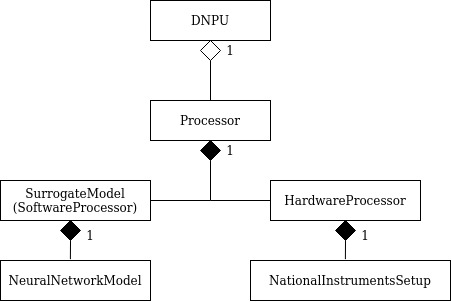
Subpackages#
Submodules#
brainspy.processors.simulation.model module#
Module for creating and using a neural network model.
- class brainspy.processors.simulation.model.NeuralNetworkModel(model_structure: dict)[source]#
Bases:
ModuleA class for predicting the raw input/output relationship of a DNPU hardware device with a neural network model. It consists of a custom length fully connected layer.
- build_model_structure(model_structure: dict)[source]#
Build the model from the structure dictionary. First perform the consistency check, then set the layers and activations. This method is called when an object is created.
- Parameters:
model_structure (dict) –
Dictionary containing the weights and activations of the model. The following keys are required:
1. D_in : int Number of inputs (electrodes).
2. D_out : int Number of outputs (electrodes).
3. activation : str Type of activation. Supported activations are “relu”, “elu”, “tanh”, “hard-tanh”, or “sigmoid”.
4. hidden_sizes : list[int] Sizes of the hidden layers.
- forward(x: Tensor) Tensor[source]#
Do a forward pass through the raw neural network model simulating the input-output relationship of a device.
Example
>>> model = NeuralNetworkModel(d)
>>> model.forward(torch.tensor([1.0, 2.0, 3.0]))
torch.Tensor([4.0])
- Parameters:
x (torch.Tensor) – Input data.
- Returns:
Output data.
- Return type:
torch.Tensor
- structure_consistency_check(model_structure: dict)[source]#
Check if the model structure follows the expected standards: Are activation, input dimension, output dimension, and hidden layer number and sizes are defined in the config? If they aren’t, set them to default values and print a warning. This method is called when an object is created.
- Parameters:
model_structure (dict) – Dictionary of the configs.
- Raises:
UserWarning – If a parameter is not in the expected format.
- training: bool#
brainspy.processors.simulation.processor module#
File containing the main class for Software Processor, which goes inside the Processor class.
- class brainspy.processors.simulation.processor.SurrogateModel(model_structure: dict, model_state_dict: OrderedDict | None = None)[source]#
Bases:
ModuleA class that consists of an instance of brainspy.processors.simulation.model.NeuralNetworkModel which maps the raw input/output relationships of a hardware DNPU. It adds the following effects to the output: amplification correction, output clipping, and noise. The aim of these effects is to obtain a closer output to that of the setup in which the hardware DNPU is being measured. The different effects are explained in their respective methods.
The effects need to be set after creating a SurrogateModel, this is explained in __init__.
- Parameters:
model (torch.nn.Module) – The neural network the surrogate model works on.
voltage_ranges (Optional[torch.Tensor]) – Minimum and maximum voltage for each input.
output_clipping (Optional[torch.Tensor]) – Minimum and maximum values for clipping the output.
noise (Optional[Noise]) – Noise object that is applied to the output of the network (for example Gaussian noise).
amplification (Optional[torch.Tensor]) – Amplification applied to the output of the network.
- forward(x: Tensor) Tensor[source]#
Apply forward pass on self.model and subsequently apply effects if needed.
Order of effects: amplification - noise - output clipping
Example
>>> model.forward(torch.tensor([1.0, 2.0, 3.0]))
torch.Tensor([4.0])
- Parameters:
x (torch.Tensor) – Input data.
- Returns:
x – Output data.
- Return type:
torch.tensor
- forward_numpy(input_matrix: array) array[source]#
Perform a forward pass of the model without applying effects and without calculating the gradient. Works on a numpy tensor: first converted to tensor, then passed through the processor, then converted back to numpy.
Example
>>> model.forward(np.array([1.0, 2.0, 3.0]))
np.array([4.0])
- Parameters:
input_matrix (np.array) – Input data.
- Returns:
Data after forward pass.
- Return type:
np.array
- get_key(configs: dict, effect_key: str) float | str | None[source]#
Get a key from a dictionary, if the dictionary does not contain the key, return ‘default’ (or None if the key is ‘noise’).
Example
>>> configs = {"amplification": [2.0]}
>>> model.get_key("amplification")
[2.0]
>>> model.get_key("output_clipping")
"default"
>>> model.get_key("noise")
None
- Parameters:
configs (dict) – Dictionary from which a value is needed.
effect_key (str) – The key for which the value is needed.
- Returns:
The value of the key or ‘default’ or None.
- Return type:
str or list[float] or None
- get_voltage_ranges() Tensor | None[source]#
Return the voltage ranges of the processor. Will return None if not set yet.
- Returns:
The voltage ranges of the processor.
- Return type:
torch.Tensor
- is_hardware()[source]#
Method to indicate whether this is a hardware processor. Returns False.
- Returns:
False
- Return type:
bool
- set_amplification(info: dict, value: list)[source]#
Set the amplification of the processor. The amplification is what the output of the neural network is multiplied with after the forward pass. Can be None, a value, or ‘default’. None will not use amplification, a value will set the amplification to that value, and the string ‘default’ will take the data from the info dictionary.
This method is called through the “set_effects” method.
Example
>>> model.set_amplification(info, [2.0])
- Parameters:
info (dict) – Dictionary with information of the processor. Documented in set_effects_from_dict.
value (None or list[float] or str) – The value of the amplification (None, a value or ‘default’).
- Raises:
AssertionError – If the list given has the wrong length.
UserWarning – If the amplification is changed.
- set_effects(info: dict, voltage_ranges='default', amplification='default', output_clipping='default', noise_configs={'type': 'default'})[source]#
Set the amplification, output clipping and noise of the processor. Amplification and output clipping are explained in their respective methods. Noise is an error which is superimposed on the output of the network to give it an element of randomness. See noise.py for more information.
If any of the inputs for the effects are ‘default’ the value will be taken from the info dictionary.
Effect values are provided as lists and stored as tensors.
Order of effects: amplification - noise - output clipping
Example
>>> model.set_effects(info,
                   voltage_ranges="default",
                   amplification=[2.0]),
                   output_clipping="default",
                   noise={"type": "gaussian", "variance": 1.0})
- Parameters:
info (dict) – Dictionary with the info of the model. Documented in set_effects_from_dict.
voltage_ranges (str or list[list[float]]) – Voltage ranges of the activation electrodes. Can be a value or ‘default’. By default ‘default’.
amplification (str or list[float]) – The amplification of the processor. Can be None, a value, or ‘default’. By default ‘default’.
output_clipping (str or list[float]) – The output clipping of the processor. Can be None, a value, or ‘default’. By default ‘default’.
noise_configs (dict) – The noise of the processor. Can be None (will generate no noise) or a dictionary with keys “type” and “variance” (the latter only in case of Gaussian noise).
- set_effects_from_dict(info: dict, configs: dict | None = None)[source]#
Set the effects of the processor from a dictionary (voltage_ranges, amplification, output_clipping, noise). See set_effects for more details.Need to provide info dictionary in case configs are set to “default”.
Effect values are provided as lists and stored as tensors.
Example
>>> configs = {"amplification": [2.0],
>>>            "voltage_ranges": [[1.0, 2.0]] * 7,
>>>            "output_clipping": [2.0, 1.0]}
>>> model.set_effects_from_dict(info_dict, configs)
- Parameters:
info (dict) –
Info dictionary of the processor. 1. activation_electrodes:
1.1 electrode_no : int Number of activation electrodes.
1.2 voltage_ranges : list[list[float]] Voltage ranges for the input (activation) electrodes. Should contain a pair of values (min and max) for each input.
2. output_electrodes: 2.1 electrode_no : int Number of output electrodes.
2.2 amplification : list[float] Amplification applied to the output electrodes.
2.3 output_clipping : list[float] Clipping applied to the output electrodes (2 elements: maximum and minimum value in that order).
configs (dict) –
Dictionary containing the desired effects.
1. amplification : list[float] Optional, ampfliciation to be applied to the output of the network.
2. voltage_ranges : list[list[float]] Optional, voltage ranges of the input electrodes.
3. output_clipping : list[float] Clipping applied to the output electrodes.
4. noise : dict Optional, noise to be applied to the output of the network.
- set_output_clipping(info: dict, value)[source]#
Set the output clipping of the processor. Output clipping means to clip the output to a certain range. Any output above that range will be replaced with the maximum and any output below will be set to the minimum. Can be None, a value, or ‘default’. None will not use clipping, a value will set the clipping to that value, and the string ‘default’ will take the data from the info dictionary.
This method is called through the “set_effects” method.
Example
>>> model.set_output_clipping(info, [2.0, 1.0])
- Parameters:
info (dict) – Dictionary with information of the processor. Documented in set_effects_from_dict.
value (None or list[float] or str) – The value of the output clipping (None, a value or ‘default’).
- Raises:
AssertionError – If the list given has the wrong length.
UserWarning – If the output clipping values are changed.
- set_voltage_ranges(info: dict, value)[source]#
Set the voltage ranges of the processor to a given value or get the value from the info dictionary (if value is ‘default’). If value is None, nothing happens, since the voltage ranges should never be None.
This method is called through the set_effects method.
Example
>>> model.set_voltage_ranges(info, [[1.0, 2.0]] * 7)
Here the voltage range is set to 1.0 to 2.0 for each of the 7 activation electrodes.
- Parameters:
info (dict) – Dictionary with information of the processor. Documented in set_effects_from_dict.
value (str or list[list[float]] or None) – Desired value for the voltage ranges, can also be None (nothing happens) or ‘default’ (get the value from the info dict).
- Raises:
AssertionError – If the list given has the wrong length.
UserWarning – If the voltage ranges are changed.
- training: bool#